10 Practical, Everyday Gemini Image Prompts
AI image tools aren’t just for concept art and stylized illustrations — they’re becoming everyday utilities. This week, I tested a set of prompts that solve real, practical problems: better photos, cleaner design workflows, easier decision-making, and small-business shortcuts.
Here’s a curated list of 10 practical Gemini prompts you can use immediately. Copy/paste, attach your photos, and let the model handle the rest.
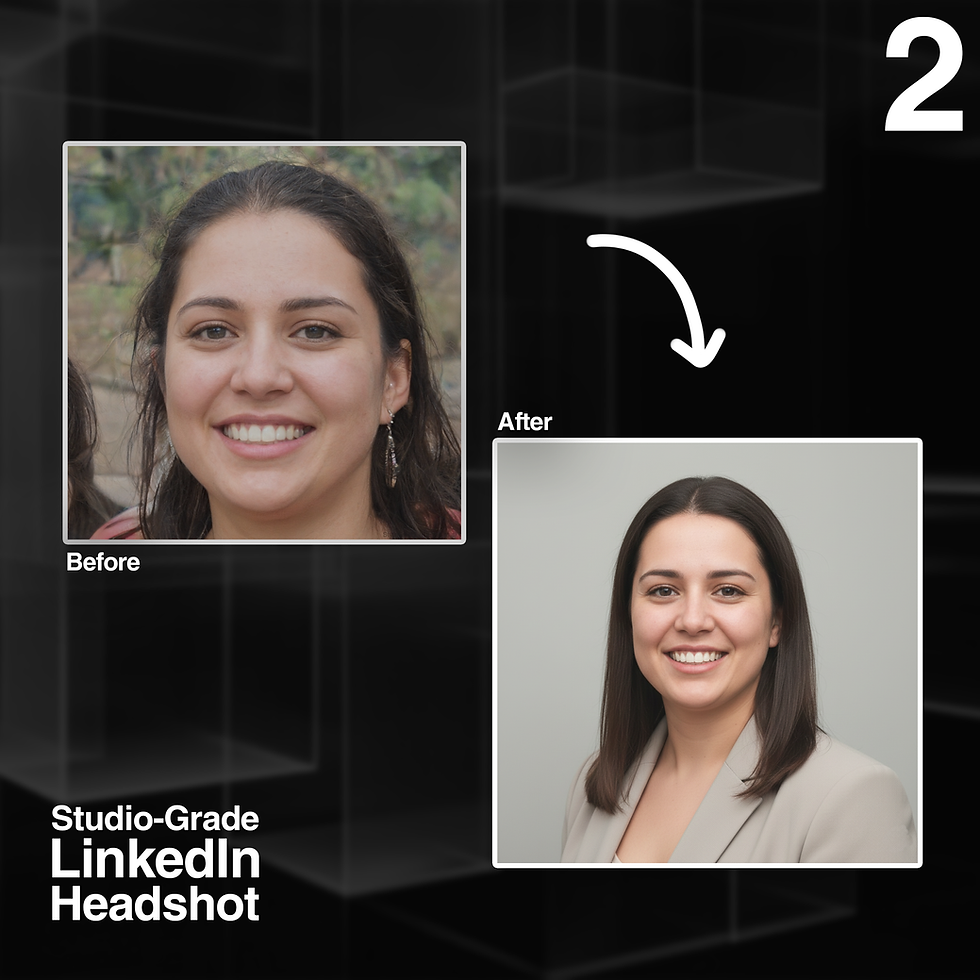
1. Professional LinkedIn Headshot
Prompt:A polished, natural-looking headshot based on my uploaded image. Maintain my exact facial structure and identity. Style me in a clean neutral blazer, soft diffused studio lighting, and a solid light-gray background. Capture from chest-up with ample headroom. Subtle cinematic color grading, crisp details.
Why it’s useful:Perfect when you need a professional headshot but don’t have access to a photographer or studio.

2. Meal-Prep Photo Beautification
Prompt:Turn this picture of my dinner into a clean, bright, professional food photo. Keep the plate composition the same but enhance colors, lighting, and texture. Add a soft natural kitchen background with shallow depth of field.
Why it’s useful:Ideal for recipe posts, restaurant menus, IG content, or just documenting your meals beautifully.

3. Apartment Interior Redesign
Prompt:Redesign this photo of my living room into a modern, cozy apartment with warm wood tones, soft ambient lighting, lush plants, and a minimal Scandinavian layout. Keep walls and permanent fixtures the same. Provide a realistic, achievable aesthetic.
Why it’s useful:Helps you visualize home upgrades before spending money — décor, layout, materials, and mood.

4. Outfit Inspo for the Day
Prompt:Using the attached selfie and today’s weather (describe weather), generate a realistic outfit image showing what I should wear. Keep my face and body realistic and maintain my identity. Clothing should be practical, stylish, and season-appropriate.
Why it’s useful:Quickly solves the “what do I wear today?” problem — especially helpful in extreme weather.

5. Product Mockup for Small Business
Prompt:Create a high-quality product mockup featuring my uploaded logo on a clean white water bottle. Present it as a studio product shot with soft shadows, crisp reflections, and centered framing. Minimalist aesthetic.
Why it’s useful:Saves hours of design work and eliminates the need for expensive mockup templates.

6. Travel Photo Enhancement
Prompt:Enhance this travel photo into a warm, cinematic postcard version. Keep all real details but improve lighting, color harmony, sky, and contrast. Add subtle film grain.
Why it’s useful:Elevates your travel memories into frame-worthy postcard visuals.

7. Vision Board Style Photo
Prompt:Generate a calm, minimalistic vision-board collage using keywords: [your goals]. Include gentle pastel colors, clean typography, and imagery that feels modern and aspirational. Make it IG-friendly.
Why it’s useful:Great for goal-setting, motivation, and clean aesthetic posts for social media.

8. Event Poster Generator
Prompt:Design a clean, minimal event poster that uses the text: [insert event details]. Use modern typography, balanced negative space, and a soft color palette. Make it look professionally designed and print-ready.
Why it's useful:Saves time and replaces Canva for quick announcements — study groups, parties, workshops, etc

9. Business Card Concept Preview
Prompt:Using my name, title, and uploaded logo, generate 2–3 modern business card concept designs. Show both the front and back layouts. Use clean typography, balanced spacing, and subtle minimal design elements. Keep the color palette professional and cohesive with the logo. Make the results look print-ready and high-quality.
Why it’s useful:It gives you instant visual concepts before committing to a designer or print shop — perfect for freelancers, small businesses, or anyone refreshing their personal brand.

10. Document Snapshot → Clean Scan
Prompt:Transform this phone photo of a document into a clean, high-quality scan. Flatten the perspective, brighten the paper, darken the text, and remove shadows or wrinkles. Keep all text unchanged.
Why it's useful:Perfect for forms, receipts, school notes, or anything you need to upload.


Comments